

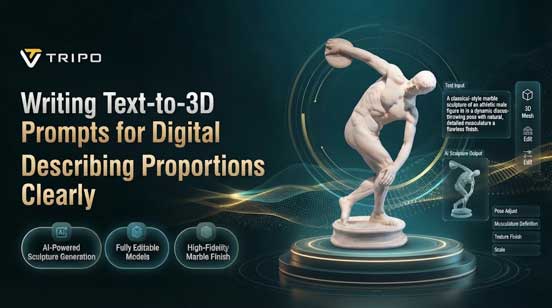
Digital Sculpture Generation enables artists to use natural language prompts to describe form, anatomy, posture, volume and visual character. Natural proportions are based on the relationships among major masses, smaller structures, joints and the entire silhouette. Tripo 3D enables sculptural research, converting elaborate descriptions into three-dimensional objects that can be edited and developed.
Translating Sculptural Intent Into Text
A good prompt begins with the general shape and progresses to posture, volume, symmetry, anatomy, and overall style. An AI 3d model generator can understand relationships when the description uses clear spatial language that connects the visible forms. State the subject in the first sentence — for example, the pose, body orientation, main masses, and the desired sculptural form. Then describe smaller structures, such as facial planes, fingers, folds, grooves, and decorative elements, clearly afterward. Proportion terms should explain the relationship between related forms rather than relying on vague artistic language alone. Use discernible geometry rather than non-spatial terms when describing abstract artistic intentions. Explain whether the posture is straight, squat, leaning, balanced, or twisted when posture affects the composition. This sequence keeps the prompt organized and gives priority to major forms when the model interprets it.
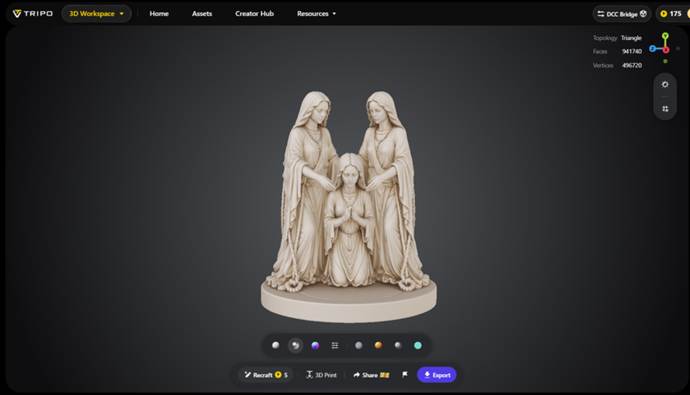
Designing Natural Proportions Through Structured Prompts
Stay ahead of the geopolitical week.
MD Briefing delivers expert analysis across five global fronts — the Indo-Pacific, energy, geoeconomics, European security, and the Middle East — every Monday morning. Free.
Relationships between the head, torso, limbs, joints, hands, feet and supporting forms are essential for natural-looking sculpture. The same proportional thinking is utilized when an image to d model workflow is used to create a sculptural model from a visual reference. Begin with head and torso scale, as these masses set the primary anatomical rhythm of the figure. Relate shoulders, elbows, wrists, hips, knees and ankles via positional relationships and proportions that are well explained. Weight distribution affects the spatial relationship of all the major masses, which in turn has a strong effect on perceived proportion, and this is heavily influenced by posture. The balance of the torso, pelvis, legs and supporting surface underneath a standing figure must be convincing. Stability can be created by symmetry, and controlled differences between paired forms can create expressive concepts. Maintain those differences on purpose by stating how and how strong the asymmetry should be. Before adding textures, ornaments, or intricate surface characteristics, a clear silhouette should remain recognizable.
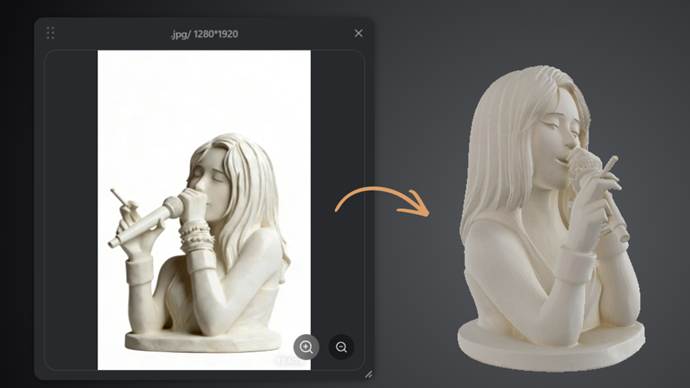
Steps to Create Digital Sculptures Through Text to 3d Model With Natural Proportions
Step 1: Turn Your Sculpture Idea Into a Prompt
- Begin by accessing Tripo3d and signing up. After entering the platform, select the “Model” tab from the vertical left menu bar.
- Under the menu, click “HD Model” to access the detailed model generation options.
- Select “Text to Model” and describe your sculpture with details about its form, proportions, pose, and overall appearance.
Step 2: Shape the Sculpture With AI Controls
- In “General settings”, adjust “Geometry and Texture” according to the level of sculptural detail you want. You can switch on “Ultra Mesh Quality” for a more detailed and realistic model.
- By enabling “AI Complete” in the “Geometry & Texture panel”, you can have AI generate the model’s geometry and texture in one process. The panel manages both aspects of generation. Another option is to enable texture generation and select your preferred “Texture Quality”, including 2K, 4K, or 8K.
- Turn on “PBR” when you want the sculpture’s materials to show more accurate reflective properties.
- Select either “Quad” or “Triangle” topology to control the topology characteristics of the sculpture.
- You can also choose a custom polycount to set the geometric detail of your digital sculpture.
- The Members Only area offers “Generate in Parts”, “8K Texture”, and “Privacy” for trial use, allowing “Trial x1” per session. Note: “Generate in Parts” is billed separately using points.
- Choose from the models currently available in Tripo. These include “V3.1”, “V3.0”, and “V2.5”, each offering distinct generation quality, stability, and use-case characteristics. Note: “V3.1” may result in increased waiting time.
- Once your settings are complete, click “Generate Model” and let Tripo create the digital sculpture.
Step 3: Examine and Prepare the Final Sculpture
- Your completed model supports multiple display modes for easier inspection. You can select Wireframe Mode, White Model View, Texture View, Shader, or HDRI. Use “Refine” in the bottom menu when you want to enhance the design.
- You can change the viewing environment through “Environment Settings”. Use “Reset Camera” to adjust the camera settings and find a better view.
- You can choose “3D Print” if you want a physical version of the sculpture. You can also use “Share” to send the design directly to others.
- Finally, select “Export” from the bottom menu. Set the resolution, format, and filename, then click “Export” once more to save the sculpture to your local device.
Proportion Elements To Define Within Sculptural Prompts
- Primary silhouette: Make a clear statement of the overall contour, stance, volume distribution and main visual features.
- Head and torso: Create relative scale, posture, orientation and linkages of major anatomical masses.
- Limbs & joints: Indicate approximate relationships between upper sections, lower sections, joints and overall posture.
- Hands and feet: Identify familiar length and size, placement and direction, and visible features and form.
- Facial structure: Identify clearly major facial forms, expression, symmetry and sculptural treatment in the style.
- Surface details: Folds, grooves, textures, or decorative elements are added after proportions of the primary sculptural forms have been determined.
Refining Sculptural Form Through Visual Inspection
By viewing the scene from various angles, disproportionate volumes and unexpected relationships can be seen; a single camera angle may conceal that. With Solid View, shift the focus to the shape and mass distribution, and the silhouette instead of the surface. Turn the sculpture around and look at the front, side, back and 3/4 angles before making specific adjustments. Correct posture when weight distribution is not evident, or there are major masses that don’t seem supported by the posture. Use scale when one element appears to be visually dominant but does not adequately support the intended sculptural hierarchy. After adding or removing limbs, adjusting facial structure, torso volume or decorative features, recheck the silhouette clarity. Some of the forms that are generated might need a few passes to refine, depending on the input quality and settings.
Balancing Natural Form With Artistic Stylization
When relationships between large forms are sustained in a visually intentional manner throughout the sculpture, stylized proportions can be considered coherent. In the case of realistic anatomy, it is important to avoid deliberate exaggeration (lengthened limbs, large faces, etc.). A stylized head can be enlarged while maintaining proportionalities between head, torso, neck, shoulders and hands. Expressive asymmetry can have a reinforcing effect on identity if the prompt is precisely indicated and shows where and how it should be used (for what visual effect). Character can be achieved by leaning, twists, crouches, reaching, or distributing weight unevenly among forms. The text to 3d model process decodes these instructions, depending on model capabilities and selected settings. The proportions of the generated models will vary according to the prompt, the interpretation of the model, the choice of geometry and topology, and the desired texture configuration.
Conclusion
Prompting based on proportion provides more direction for digital sculpture generation, regarding silhouette, anatomy, posture, volume, and space relationships. When generating or refining, major forms should be determined first, smaller details later. The geometry settings, topology, texture options and viewing modes can affect the development of the resulting sculpture. Tripo 3D provides sculptural exploration with descriptive generation, control over the modeling process, visual inspection, and export. Careful refinement is still a key part, as generated proportions rely on prompt clarity and model interpretation.