


Every website eventually runs into the same problem: it begins to feel more and more sluggish while the hosting bill somehow continues to rise.
The good news is that faster hosting does not necessarily mean more expensive hosting as well. With options like Atlantic.net, you can get speed as well as great support and high-end security for a fair price. And if you measure the right things and fix the right bottlenecks, you can often cut waste further to make your site even quicker.
This way, when it is actually time to spend more, you’ll know exactly what you’re buying and why, so let’s walk through how to balance performance and price.
Speed Is a Budget Decision
Stay ahead of the geopolitical week.
MD Briefing delivers expert analysis across five global fronts — the Indo-Pacific, energy, geoeconomics, European security, and the Middle East — every Monday morning. Free.
Speed is not only about pride or your brand image. It actually affects how long people stay on your site and how often they come back, which in turn impacts how likely your pages are to show up in search.
Google publishes clear guidance on real-world speed signals through Core Web Vitals (loading, responsiveness, and visual stability). If you want a quick overview straight from the horse’s mouth, this is the best starting point.
The thing is that if you don’t know which speed metric is failing, you can easily spend money in the wrong place. More RAM won’t fix a slow database query, and a bigger server won’t fix a site that’s calling a legion of third-party scripts before showing the first line of text.
Measure Twice, Cut Once
Most hosting plans advertise things that are hard to connect to the user experience. What you should care about almost exclusively are signals that map to how fast a site feels to a real user.
That means focusing on how long until content appears and the page is usable, and how quickly the server responds when the browser asks for the first byte. You don’t need to memorize the names of these metrics now, but you do need to know whether the delay is happening on the server side, the front end, or both.
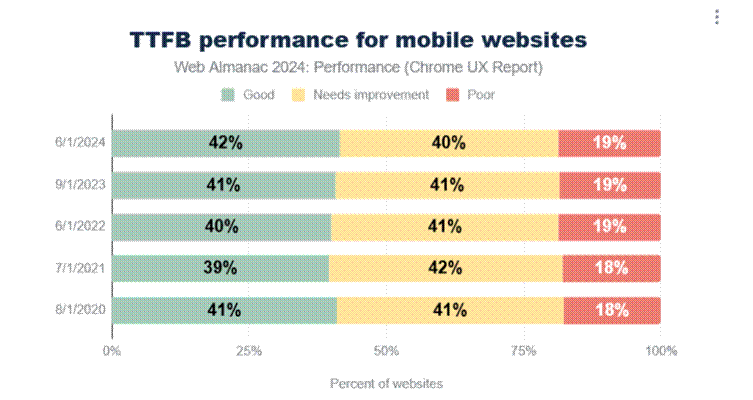
[Source: Web Almanac]
In terms of the source of this information, you don’t need to go further than the Chrome User Experience Report (CrUX), which describes how real Chrome users experience sites at scale. Google’s own overview explains what CrUX is and what it includes.
When you measure, try to capture two views at the same time. First, what a tool sees in a controlled test, and second, what real users see across different devices and networks. The gap between those two often explains why a site looks fine on a laptop but feels heavy on a phone.
If your website is small with mostly static pages and doesn’t do a lot of server-side work, you can often run it on modest hardware and still get great speed.
In that case, going straight for a premium plan can be like buying a sports car to drive exclusively in a 25mph school zone: it lands you some bragging rights, but you don’t get there any faster.
The much smarter move is to spend your time on things that make a small site slow in the first place, like oversized images, unneeded plugins, messy themes, and pages that load too many different fonts. With those kinds of issues, even doubling your hosting budget can still leave you feeling disappointed, so direct your efforts and budget to the right spots.
Most Common Origins of Performance Issues
When a site is slow, the cause is usually one of these:
- The server takes too long to generate the page because the app is doing too much work per request. This can be a database issue, a slow plugin, or a heavy framework doing extra steps you don’t need.
- The page is too large because the site ships huge images and too many third-party tools. This is common on marketing sites that slowly collect widgets over time.
- The server is too far. Distance matters because every round-trip takes time, even on fast networks.
- The server is fine, but traffic spikes cause a “crowd problem.” One person has a great experience, then ten people show up at once, and everything slows down.
Obviously, you don’t fix all of these the same way, which is why you need to measure first if you care about cost. Which you do.
Cheapest Speed Upgrade: Reducing Work
Before you upgrade a plan, try to reduce the amount of work your site forces the server to do for each visit.
If your platform supports caching, use it. Caching means the server reuses the result of work it already did, instead of rebuilding the same page from scratch for every visitor. For content pages that don’t change every minute, caching can be the difference between needing a bigger server and running like clockwork on the current one.
Also, look for features that are slow by design, like filters that recompute results every click, or plugins that load extra data on every page, even when the page doesn’t need it. These are way more common than they should be and very resource-intensive.
The great thing about reducing server work is that it’s a double-whammy: you get faster pages while lowering hosting needs at the same time.
Most Overlooked Cost: Bandwidth and Page Weight
A heavy website costs more for several reasons, not least because it costs visitors more time, especially on mobile connections, which means it leads to fewer conversions because people don’t like waiting. It also costs you bandwidth and often necessitates going for a higher-tier hosting plan.
If you want to see how the web performs in the wild, so you can compare and contrast, the HTTP Archive’s Web Almanac is useful because it’s based on real data. The 2024 performance chapter is a good reference point.
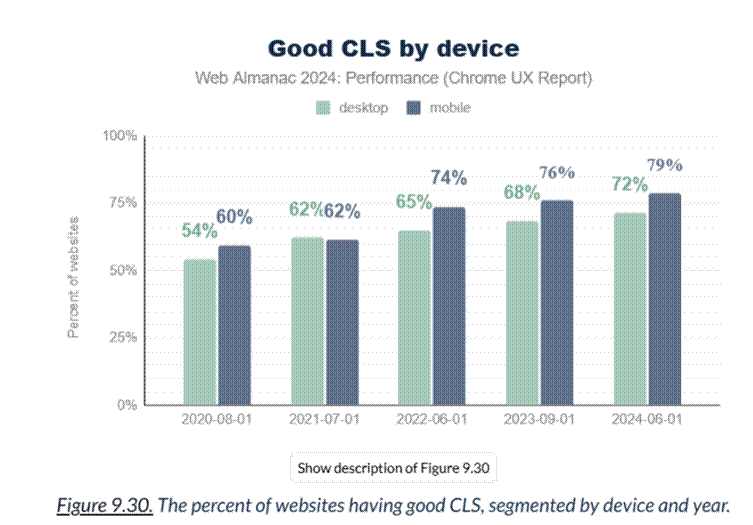
[Source: Web Almanac]
In plain terms, if you can make your pages smaller, you often make them faster and cheaper to host.
Match the Plan to the Workload
You can often stay on a simple plan and focus on front-end weight and caching if your site is mostly static and gets steady traffic. On the other hand, if it is dynamic and database-heavy, you obviously need reliable compute and a setup that won’t collapse under traffic bursts.
For an online store or membership platform, or anything that people pay for, you also need stability and support. Paying a bit more can be rational if it prevents downtime during the hours that matter most.
The bottom line is that if you can pay to get rid of your most limiting bottleneck, you should probably take that chance, but you should not be going for the biggest bundle of specs at any cost.
Sometimes the site is optimized and still slow because the server is simply running out of room to breathe. You’ll usually see this as high server response times even when pages are already optimized, and caching is working. You may also see that speed drops sharply at peak times.
In that case, you can move to a plan with more consistent resources or spread traffic across more than one server if your setup supports that. But you can also isolate the database so it isn’t competing with the web app. The idea is to pick the cheapest option that solves the measured problem.
Big Location Decision
Where your site is hosted changes data access rules and your legal exposure, but even if you only care about speed, there’s the question of latency and resilience during regional outages.
Physical distance increases delay, so if many of your users are in Europe and your server is far away, every interaction takes longer. There’s also the fact that digital infrastructure is now treated as a national security priority, not just a business tool, which is very much worthy of consideration.
The fact is that if your site supports customers across borders, choosing regions and redundancy has turned into much more than a simple tech choice.
Speed and Security Are Not Enemies
Although you may think that sacrificing security could give you a bit of extra speed (or vice versa), in practice, sloppy security often becomes a performance problem because incidents create downtime and emergency migrations, which lead to surprise costs.
Even basic guidance like hardening servers and keeping software updated reduces risk on the new cybersecurity battleground, along with controlling access, of course. For sites that handle sensitive data or support critical services, resilience and compliance can justify higher hosting costs, because the alternative is paying later in a worse way.
Not a One-and-Done
Balancing performance and price is a long-term habit. You need to look at your real-user speed signals and your hosting bill at least once every quarter (ideally every month.
If performance is stable and resource usage is low, you may be able to downgrade or right-size, but if performance is slipping while usage climbs, you need to optimize, upgrade, or both.
When you treat speed like a budget line item, you stop guessing and paying for fear, and you start getting those measurable improvements that users actually feel. Over time, that’s how you end up with a site that stays quick and reliable while your costs stay under control.