


If you’re here, you probably noticed that AI-generated emails look polished but often fail to connect. They seem to be grammatically correct, follow structure, use proper language, and still sound off to many people. That’s why it’s important to know how to humanize email newsletters with AI tools that improve tone and intent. And we created this list of the best humanizers to help you make your emails feel human.
Why AI-Written Emails Get Ignored
AI did not ruin professional email writing – overuse did. As automated writing becomes standard in marketing and business workflows, readers have learned to spot it instantly. This shift explains why even well-written AI emails often fail to earn attention.
Here are common reasons AI-written emails fail:
- AI content fatigue is real. Users are exposed to more AI-generated content than ever, often across blogs, social media, and email. This constant repetition of similar phrasing and structure leads to a sense of exhaustion and disengagement. Businesses relying too much on automation risk sending messages that feel generic and safe, not valuable.
- AI emails feel low-effort, even when they are correct. Surveys indicate that more than 50% of users are less likely to engage with content they believe was written by AI, often describing it as generic, impersonal, or disposable. In email inboxes, this perception translates directly into lower opens and replies
- Uniform tone signals automation. AI-generated emails tend to balance sentences too evenly and rely on safe phrasing. Readers subconsciously associate this with mass automation, which reduces trust in the message and the sender.
This is why many teams now look beyond basic rewriting and seek top rated free solutions to humanize AI content, alongside professional tools designed specifically for business email tone.
Stay ahead of the geopolitical week.
MD Briefing delivers expert analysis across five global fronts — the Indo-Pacific, energy, geoeconomics, European security, and the Middle East — every Monday morning. Free.
How We Evaluated AI Humanizers for Email
To create this list, we tested 20 of the most popular AI humanizer tools used for business writing and email marketing. The goal was not to see which tool rewrites text the most aggressively, but which one actually improves professional email quality without breaking tone, structure, or intent.
To keep the test realistic, we started at the source. First, we asked several leading AI models (ChatGPT, Gemini, and Claude) to generate the same types of email newsletters. These included promotional emails, informational updates, and neutral business announcements written in a standard professional tone. This gave us consistent, comparable AI-generated inputs.
We evaluated the results across multiple layers:
- Grammar and clarity check. We verified that humanization did not introduce errors or awkward phrasing. This step combined automated grammar checks with Grammarly and manual review to catch subtle issues tools often miss. Each tool received a score from 1 to 10, where 10 represents flawless grammar and clean readability.
- Stylistic realism test. We looked for human signals that matter in email: sentence variation, natural emphasis, intentional pauses, and realistic transitions. Over-smoothed or overly symmetrical text scored lower.
- Professional tone control. We checked whether the output maintained a business-appropriate voice. Tools that pushed emails toward casual, emotional, or vague language lost points.
- Intent and structure preservation. We reviewed subject lines, openings, and CTAs to confirm that meaning, hierarchy, and purpose stayed intact after humanization.
- AI pattern detection and detector checks. While AI detector scores are not critical for email newsletters in most business contexts, they remain useful for identifying shallow or mechanical rewrites. We reviewed outputs manually and cross-checked them using GPTzeroand ZeroGPT to see which tools genuinely reduce recognizable AI patterns rather than relying on superficial changes.
Each tool received individual category scores, followed by an overall rating on a 10-point scale. A 10 indicates exceptional performance across grammar, tone, structure, and AI pattern reduction. Comparative ratings reflect direct competition across the same AI-generated email inputs, which allowed us to measure not just isolated strengths but consistency under identical conditions.
Top 6 AI Humanizer Tools for Email Newsletters
Below are the six AI humanizers that can humanize email newsletters and make them sound less robotic and more like something a human would send on purpose.
1. Clever AI Humanizer
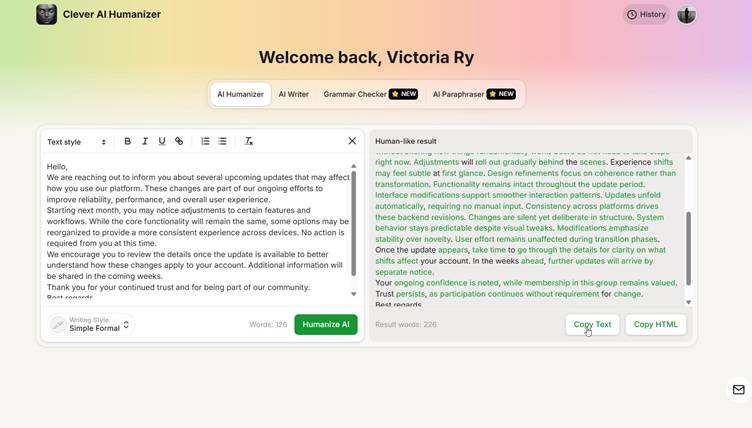
Our rating (email use): 9.5 / 10
Grammar score: 9/10
AI detection: Very low, 0-5% even on strict detectors
Tone control: Strong, multiple styles available (Casual, Simple Academic, Simple Formal)
Free access: 200,000 words for free, 7,000 per run
Extras: AI Writer, Paraphraser, Grammar Checker, History
Clever AI Humanizer delivered the most balanced results in our email newsletter tests. It consistently improved sentence flow and tone without disrupting structure or call-to-action placement. This made it especially reliable for teams that need to humanize a professional email without turning it casual or vague.
Many competing tools lock core features behind paywalls. Grammar checks, professional email tone, longer inputs, or multiple rewrites often require upgrades. Clever keeps all of this free, without ads, and you can use it without registration, which makes testing and daily use surprisingly frictionless.
We also liked the built-in AI Writer. You can generate email newsletters directly inside the tool instead of switching to another platform and pasting the text into a separate humanizer. It allows you to set the word count and choose the language, which helps teams that run multilingual campaigns. The AI Writer already produces humanized output by default, so in many cases, you don’t need an additional rewrite step.
In our email newsletter tests, Clever handled professional tone well. It kept structure intact, didn’t weaken CTAs, and avoided the over-polished, symmetrical phrasing that makes AI emails feel low-effort. Grammar and readability stayed consistent, even in longer updates. Detector checks confirmed what the text already suggested. Outputs regularly landed in the 0–5% AI range, even on stricter detectors. In our tests, it ranked first in bypassing the GPTZero detector. More importantly, these results came from natural phrasing, not awkward synonym swaps.
2. Decopy AI Humanizer
Our rating (email use): 7.8 / 10
Grammar score: 8.5 / 10
AI detection: Medium–low ( up to 15% AI)
Tone control: Provides different styles, but it’s not very consistent
Free access: Yes (quota-based, no login for basic use)
Limits: Quotas + premium credits system
Extras: AI Detector, Humanizer, Summarizers, Student tools
Decopy AI is a “do-everything” platform rather than a focused email humanizer, and that shows in testing. It can rewrite AI-generated emails to sound less robotic, but the output often stays generic and safe. For short, neutral messages, the results are usable. For newsletters with structure, CTAs, or brand tone, manual editing is usually needed.
Decopy offers a free tier, allows limited use without registration, and provides a wide set of tools in one dashboard. That makes it easy to test quickly. However, many core features rely on quotas and premium credits, which reset monthly unless you purchase top-ups. Compared to Clever AI Humanizer, useful functionality becomes restricted much sooner.
We let the tool humanize AI email. Decopy improved surface-level phrasing but struggled with rhythm and emphasis. Sentences often became simplified rather than refined, which made emails feel flatter instead of more deliberate. Grammar stayed acceptable, but tone control was inconsistent, especially in longer newsletter-style emails. Decopy’s AI detector is also worth mentioning, mainly as a limitation. It tends to be far less sensitive than stricter detectors, which means low AI scores do not always reflect strong humanization.
3. GPTHuman
Our rating (email use): 8.2 / 10
Grammar score: 8 / 10
AI detection: Mixed (strong internal detector, weak real-world bypass)
Tone control: Medium (multiple modes, uneven results)
Free access: Limited (300 words total)
Limits: Strict word caps per plan, rewrite length capped per run
Extras: AI Humanizer, AI Detector, Paraphraser, Content Generator, API
GPTHuman positions itself as a premium humanizer with a strong focus on bypassing AI detectors. On paper, it looks impressive: multi-tone controls, multi-language support, built-in detection, and bold claims about passing GPTZero, Turnitin, and similar tools.
In our tests, GPTHuman handled grammar and basic readability well, but tone often felt over-engineered. Emails lost subtle emphasis, and CTAs sometimes became flatter or less direct. This mattered most in promotional and announcement-style newsletters, where intent and structure need to stay sharp.
Detector performance did not match the platform’s promises. After humanization, emails still scored as 50-60% AI on GPTZero, Turnitin, and ZeroGPT, with only partial improvement on more lenient detectors. GPTHuman’s own AI detector, however, was accurate and consistent, correctly distinguishing between AI, human, and humanized text.
Another drawback is pricing friction. The free tier is extremely limited, and paid plans cap output length per run.
4. Stealthy AI Humanizer
Our rating (email use): 7/ 10
Grammar score: 7 / 10
AI detection: Inconsistent
Tone control: Low–Medium (Light / Balanced / Deep modes)
Free access: Yes, 80 words per run on free tier
Extras: Built-in AI detector, plagiarism checks, multi-language support
Stealthy AI Humanizer is built primarily around detector avoidance, and that priority comes at a cost for email quality. While the interface looks clean and the workflow is simple, the humanization results were unreliable for newsletter-style content.
In newsletter tests, Stealthy handled basic rewriting reasonably well, especially when using Light or Balanced modes. These settings helped soften AI phrasing without fully reshaping the message. Deep mode applies stronger changes, which can be useful for highly repetitive text, though it may require a quick review to keep tone aligned with business emails.
Detector performance raised concerns, however. Stealthy’s internal AI detector regularly showed moderate “human” scores, but external tools like GPTZero and ZeroGPT still flagged the same output as 62% AI-generated. This gap between internal and external results makes it hard to trust the platform’s detection feedback.
Another major limitation is usability. The free tier caps input at around 80 words, which is far too restrictive for real email newsletters. Even short announcements often exceed that limit, making meaningful testing difficult without upgrading.
5. Walter Writes AI Humanizer
Our rating (email use): 7.6 / 10
Grammar score: 8 / 10
AI detection: Mixed, depends on mode and detector
Tone control: Good (Simple / Standard / Enhanced), paywalled
Free access: Trial only (300 words)
Extras: AI detector, rewrite modes
Walter Writes AI Humanizer is a solid tool for people that seek how to humanize a Professional Email, but only when fully unlocked. It rewrites AI-generated text smoothly and generally improves readability for professional emails. In newsletter tests, outputs felt polished and coherent, especially when using the Enhanced mode.
The main issue is access. Most features that matter for email work are paywalled. Tone adjustments, stronger rewrite modes, AI detection after humanization, and even content history require a paid plan. The free tier is mainly useful for quick trials, not real newsletter workflows.
In testing, the Enhanced mode produced the best email results, improving flow without making messages sound casual. Detection outcomes varied across platforms: some tools showed reduced AI signals (10-20% AI), others did not. For email newsletters, tone and clarity mattered more than detector scores, and on that front Walter Writes delivered consistent, readable output.
6. UnAiMyText
Our rating (email use): 7.1 / 10
Grammar score: 6.8 / 10
AI detection: Medium (reduces visible patterns but not reliably undetectable)
Tone control: Basic (limited customization)
Free access: Yes (quota-based)
Extras: Simple rewriting, AI detector
UnAiMyText feels deliberately minimal. It does not try to be a full writing suite or an all-in-one platform. You paste AI generated text, click humanize, and get a rewritten version that is cleaner and less obviously machine made. For short professional emails, this simplicity can actually help.
In our tests, AI detection scores usually improved after rewriting, but results depended heavily on the detector. Lenient tools showed noticeably lower AI percentages, while stricter detectors still flagged parts of the text as AI generated. This puts UnAiMyText in the middle of the pack. It reduces visible AI patterns, but it does not consistently reach near-zero detection scores.
Tone is where the limits show. The output reads clearer than raw AI text, but it rarely gains nuance. Emails stay neutral and safe, which works for basic updates or internal communication. Longer newsletters, promotional emails, or messages with stronger intent needed manual edits to avoid sounding flat.
Summary
After testing all tools on real email newsletters, Clever AI Humanizer clearly performed best overall. It delivered the most natural tone, kept structure and CTAs intact, and achieved consistently low AI detection scores without paywalls or forced registration. Other tools like Walter Writes, GPTHuman, Stealthy AI, and UnAiMyText can work in specific cases. For professional email newsletters, tools that balance tone and clarity outperform those that only chase AI detection scores.
To help you decide faster, here are all our finalists presented side by side for quick comparison:
| Tool | Email Rating | Grammar | AI Detection Results | Tone Control | Free Access | Main Limitation |
| Clever AI Humanizer | 9.5 / 10 | 9 / 10 | Very low (0–5%) | Strong, multiple styles | 200,000 words free | None significant |
| Decopy AI | 7.8 / 10 | 8.5 / 10 | Medium–low (up to 15%) | Inconsistent | Quota-based | Surface-level rewriting |
| GPTHuman | 8.2 / 10 | 8 / 10 | Mixed (50–60% on strict detectors) | Medium | 300 words total | Strict caps per run |
| Stealthy AI | 7 / 10 | 7 / 10 | Inconsistent (62% on GPTZero) | Low–Medium | 80 words per run | Very small free limit |
| Walter Writes AI | 7.6 / 10 | 8 / 10 | Mixed (10–20%) | Good (paywalled) | Trial only | Core features locked |
| UnAiMyText | 7.1 / 10 | 6.8 / 10 | Medium | Basic | Quota-based | Limited nuance |